
Share live location with your family, privately
Fuzz puts the people you love on one private, live map. See that your son or daughter reached college, your parents are home and your partner is on the way, without calling every hour to ask.
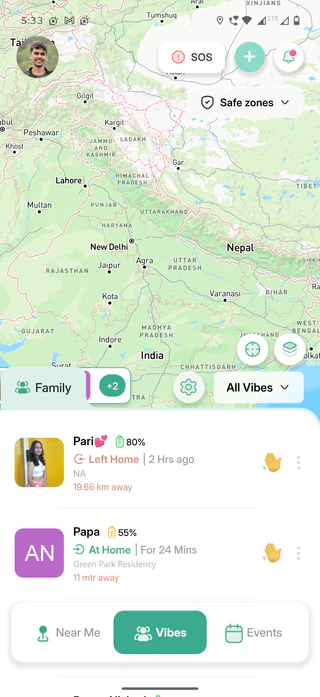
Your family on one map, in three steps.
Create your family Vibe
A Vibe is your private family circle in Fuzz. Create one called Family and add your people from your contacts.
They accept the invite
Each person accepts the invite in the app. From then on you see each other live on the map.
Stay close, quietly
See who is home and who is on the way, and get one calm alert when someone reaches a place that matters.
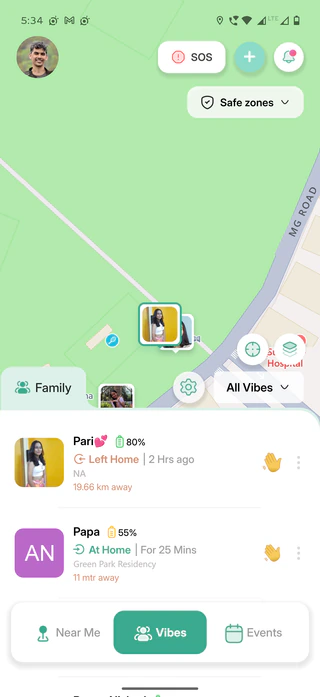
Know they got there safely.
Mark Home, College, Office or any place. Fuzz tells your family when someone arrives or leaves, so nobody has to send "reached?" again.
- Home, College, Office or any custom place
- Choose which Vibe hears about each place
- See who is at home, at college or on the way
Peace of mind, not surveillance.
One private live map
Everyone in your family Vibe, live on one map that only your Vibe can see.
Separate Vibes
Family, partner and close friends each get their own Vibe, kept apart.
Distance and battery
See how far away each person is and how much battery their phone has left.
Arrival alerts
A quiet alert when someone reaches home, college or work.
Go invisible for a while
Turn off your visibility for 8 hours, 1 day, 3 days or until you switch it back on.
Android and iPhone
Works across a mixed family: Android 7.0+ and iPhone with iOS 15.1+.
More than a dot on a map.
| Feature | Fuzz | Plain location sharing |
|---|---|---|
| Arrive and leave alerts | Included Home, College, Office and custom places | Usually you have to open the map and check |
| Separate Vibes | Included Family, partner and friends kept apart | One list for everyone |
| Go invisible for a while | Included 8 hours, 1 day, 3 days or until you turn it back on | Often on or off only |
| SOS with your location | Included One tap, built in | A separate app or a phone call |
| Battery and distance at a glance | Included For everyone in your Vibe | Rarely shown |
Frequently asked questions
How do I share my location with my family?
Install Fuzz, create a Vibe (a private group for your family) and add your family from your contacts. Once they accept the invite in the app, you see each other live on a private map. See the step-by-step guide.
Does it work if my family uses both Android and iPhone?
Yes. Fuzz works on Android 7.0 or later and on iPhone with iOS 15.1 or later, so a mixed family can share location in one Vibe.
Can my parents use Fuzz if they are not tech-savvy?
Yes. Once they install Fuzz and accept your invite, there is nothing else they need to do. Arrival alerts work on their own, and SOS is one button at the top of the map.
Can I take a break from sharing my location?
Yes. Turn off your visibility for 8 hours, 1 day, 3 days or until you switch it back on, or hide from a particular contact or Vibe. SOS still sends your location if you need help.
Is Fuzz free?
Yes. Fuzz is free to download and free to use.
Explore other features
Safe zones & arrival alerts
Know when they reach home, college or work.
SOS emergency alerts
One tap alerts your family with your location.
Live location link
Share where you are with anyone, for a few hours.
Fuzz Nearby
See friends around you and send a quick wave.
Your family, always within reach.
Create your family Vibe and add your safe places in a few taps.
 Scan to download